Dry cleaning website design, built around routes and pickup windows
Most dry cleaner sites are a brochure with a phone number on it. Yours has to take a street address, hold a pickup window it can actually serve, and text the customer when the order is ready. That is software, not a template. You talk to the person writing it.
What a dry cleaning site has to do that a template does not
A generic small-business template gives you a handful of pages and a contact form. It cannot tell a customer whether you drive their street. It cannot stop a request from landing on a route you do not run that day. It cannot say which of your storefronts is closed on a holiday. Every one of those becomes a phone call your counter staff takes while other customers wait at the counter with hangers over their arms.
The address is the first question, not the last
A pickup and delivery business is defined by a boundary. The booking flow should ask for the street address early, check it against the area you actually drive, and answer right there: yes, we come to you, here are your days — or no, but here is the nearest store and when it opens. Build that check on ZIP lists or map boundaries you control and can edit yourself. When the boundary lives in data, adding a neighborhood is a content change rather than a rebuild.
Pickup windows are capacity, not free text
A time window is inventory. If the north-side route runs Tuesday and Friday, the calendar should offer Tuesday and Friday to north-side addresses and nothing else. Each window needs a cutoff time, a cap on how many stops it holds, and a switch you can flip from your phone when a van is down. Without that, an open text box takes orders you cannot serve, and someone spends the next morning calling people back to apologize.
Per-location hours and holiday closures
With one storefront, hours are a line of text. With several, they are data. Each location needs its own weekly schedule, its own holiday overrides, and its own cutoff for same-day or next-day turnaround. Those hours should feed the page, the structured data search engines read, and the closed-today notice. One source, three outputs. Otherwise the site says open, the door says closed, and the customer believes the door.
Garment intake at the level you actually price
Customers do not know your item codes. They know two suits, a comforter, and a dress that needs the hem taken up. Intake should collect enough for the driver to plan the stop and enough for the counter to flag exceptions — household items, leather and suede, gowns, alterations, anything you price by inspection. Say plainly which items are priced at the counter. A number shown online and corrected later costs more trust than no number at all.
The ready-for-pickup notification should be a text
There is one message worth designing the whole system around: the one that says the order is ready. Send it as a text and it goes to the phone the customer already has on them. Send it by email alone and it lands in the same inbox as their receipts and their promotions, and the garments sit on your rail until they get to it.
Keep that message transactional: the order, the store or the delivery window, and what happens next. Track it per message, so a failed send shows up as a failed send — on our two-sided lead marketplace build we run Twilio SMS fan-out with per-message delivery tracking for exactly that reason, so nothing fails silently. Collect the number with clear consent at booking, honor STOP and the other standard opt-out keywords, and keep promotional sends on a separate list from transactional notices. US carrier messaging guidelines treat those two kinds of traffic differently, and that separation is much easier to build in at the start than to retrofit later.
The same message can carry a link to an order status page: picked up, in process, ready, out for delivery. A link gives a customer a way to answer their own question at eleven at night, without ringing a counter that closed hours ago.
Email still has a job, so make sure it arrives
Text handles the moment. Email handles the paper trail: booking confirmation, itemized receipt, delivery confirmation. Getting that into an inbox is a deliverability problem, not a design one. Send from your own domain with SPF, DKIM, and DMARC configured, use a provider built for transactional mail instead of routing receipts through a marketing tool, and keep newsletters on a separate sending identity so a campaign cannot damage the reputation your receipts depend on. On the build below, email runs on Resend and text runs on Twilio.
A dry cleaner we built, and still maintain
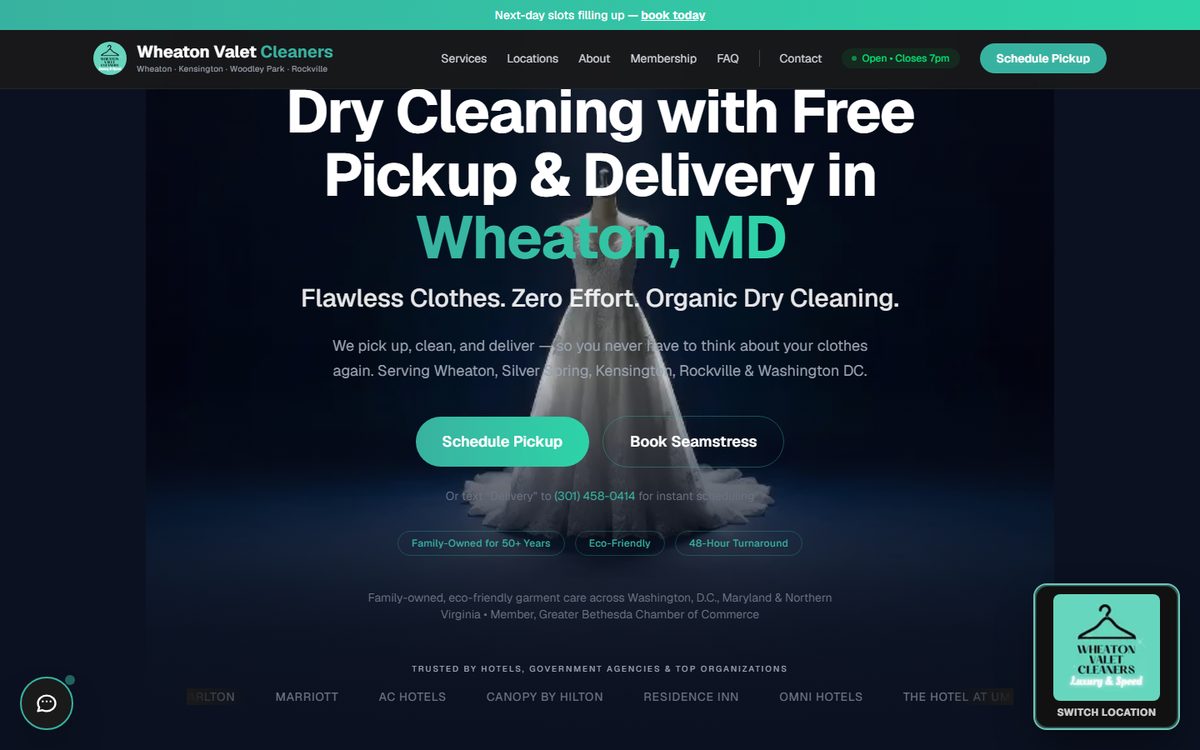
Wheaton Valet Cleaners
A multi-brand rebuild plus a federal launch, running on Next.js and Tailwind with Resend for email and Twilio for text.
Visit the live site ->The engagement is described on our work page as a multi-brand rebuild plus a federal launch — a launch serving federal customers. That is as much as we publish about it, and we are not going to dress it up with numbers nobody gave us. What we will tell you is that the relationship did not end at launch: the site is on an ongoing SEO retainer.
Several storefronts, or several brands
Multi-location changes the shape of the site. Give every storefront its own page: its own address, phone number, hours, map, and a genuinely different description of the area it serves. A single Locations page listing three addresses asks one page to cover three towns, when what you want is a page per town that can stand on its own. Identical boilerplate repeated across location pages with only the town name swapped leaves you in much the same position.
If you run more than one brand — a retail name and a route name, or two shops bought at different times — decide early whether that is one site or two. The choice drives the domain, the email sending identity, the analytics, and which name a customer searching your town actually finds. That decision is a great deal easier to make before the build than to unwind afterward.
Local SEO when you have doors people walk through
Ranking a service business with physical addresses is mostly unglamorous consistency. The pieces that carry weight:
- A page per intent, not one page for everything. A page about pickup and delivery in a named area matches the way people actually search. A page called Services is doing much less work.
- Structured data matching the business type. Schema.org has a DryCleaningOrLaundry type, a LocalBusiness subtype, and it carries opening hours, area served, and geographic detail. We generate it from the same hours data that renders on the page, so the two never drift apart.
- Name, address, and phone identical everywhere. Site, Google Business Profile, directory listings. Suite numbers and abbreviations included.
- A Business Profile per location, with the right categories, service areas, and holiday hours entered rather than left to guesswork.
- Measurement wired at launch, so the second month has something real to compare against.
We write straight SEO reporting with no invented scores. If a change did not move anything, that is what the retainer note says. Same approach whether the site is a dry cleaner, an auto shop, or a marketplace.
How the build actually runs
Scope and pricing come first: plain-language deliverables, fixed pricing, and a hard launch date, written and signed off before a line of code gets written. During the build you get daily deploys on preview URLs, so you review the real thing live, comment inline, and we ship the change the same day. You are not approving a picture of a booking flow; you are clicking through it with your own address.
Launch is a checklist, not an announcement: apex DNS cutover, SSL, sitemap submission, Search Console and GA4 wired, and real-device smoke tests before we call it live — including booking a pickup on a phone and confirming that both the text and the email arrive. After that, a monthly retainer is optional: SEO, security patches, analytics, and new features, with daily monitors watching the paths that matter. For a pickup and delivery business, that path is the booking form. If it breaks on a Saturday morning, a monitor should notice before your customers do.
No account managers, no handoffs, nothing quietly sent offshore. One builder from the first call to launch. If the route side of the business later wants a driver app or a customer app on the phone, that is iOS work we do ourselves. If you would rather judge the builds before talking to anyone, start at the studio work page, then get in touch.
Tell us how the routes run and we'll tell you what it takes.
How many locations, which days you drive, and what your counter staff repeats on the phone all day. That conversation is enough to scope the build, and you get a fixed price and a launch date in writing before any code gets written.